Learn · Start here
Detections and Objectives
Every case asks two kinds of question. This unit shows what each one is for, exactly how credit works, how to find the right technique, and what an accepted answer looks like, then lets you practice on a real technique.
About 10 min
- In this unit
- What detections and objectives test, how they're scored, and how to answer both, with a practice detection on a real technique.
- Before you start
- Your First Investigation
Why it matters
Detections test whether you can name an attacker's behavior in the language every SOC uses. That is how detection rules are written, how alerts are triaged and how incidents are handed off: "this was Exfiltration over USB" tells the next analyst exactly what happened and what to check.
Objectives test whether you can establish the facts an incident report needs: which host, which account, when, how many. Together they are what a SOC lead asks you after an incident: what did the attacker do, and what exactly did it touch?
Core concept
A detection covers one stage of the attack. Its card names the stage and asks you to identify the technique behind it, then back it with evidence.
The technique comes first. A detection earns credit only with the correct technique, chosen from the search box. Choose the most specific one your evidence supports: where a sub-technique fits, pick it rather than its parent.
Evidence earns the rest. With the right technique, the detection pays its technique share. The evidence fields pay the remainder once enough of them match: one threshold for the card, not points per field.
Objectives are the facts of the case. Most take a single value; some take a short written answer. Some cases end with a short written summary of the incident.
Tries. Every question has three. An objective uses a try on every answer until it's right. A detection uses one only when a field you filled in is wrong, so fill only the fields you're sure of: a blank field costs nothing, and you can come back to it. A wrong field is marked, so you know which one to fix.
Hints and your best result. A hint shows its price before you reveal it. Your best result on each question is kept and never lowered by a later try.
Finding the technique
- 1.
Read the stage.
The card's stage name tells you where you are in the attack: getting in, moving around, taking data out.
- 2.
Describe the behavior in plain words.
"Files were copied to a USB drive" is easier to map than a raw event.
- 3.
Search the TTP Catalog for those words.
Each page shows the technique's tactic, how it appears in telemetry, and its sub-techniques.
- 4.
Pick the most specific match.
If the catalog lists sub-techniques, choose the one your evidence supports.
- 5.
Enter it from the search box.
The box searches technique IDs and names only, so work out which technique fits in the catalog first, then pick it from the list.
What an accepted answer looks like
- A host: As it appears on the network map. Case doesn't matter.
- An account: As it appears in the logs.
- A time: In UTC, in the format the box shows under it.
- A count: The number on its own.
- A choice: Pick it from the list.
- A written answer: In your own words, covering each thing the question asks for.
Nothing close counts: a near miss is wrong.
Practice: the departing contractor
A worked example on a real technique. Everything here is invented, and nothing counts toward your path. Use the TTP Catalog page for Exfiltration over USB to answer. A wrong answer is marked and shakes, just as it does in a case.
A contractor's last day was yesterday. This morning their manager reported that a confidential pricing file may have left the company. The contractor's workstation is ws-120.corp.example. Two records stand out.
| field | record 1 | record 2 |
|---|---|---|
| @timestamp | 2026-03-11 | 2026-03-11 |
| host. | ws-120. | ws-120. |
| event. | 6416 | 4663 |
| winlog. | USB Mass Storage Device | |
| winlog. | DiskDrive | |
| winlog. | a. | |
| winlog. | \Device\ |
Practice score: nothing here counts. 0 pts
This is the whole job on a real case: read the stage, find the technique in the catalog, back it with fields from the records, then answer the facts. First Light works the same way, on a live range.
Annotated examples
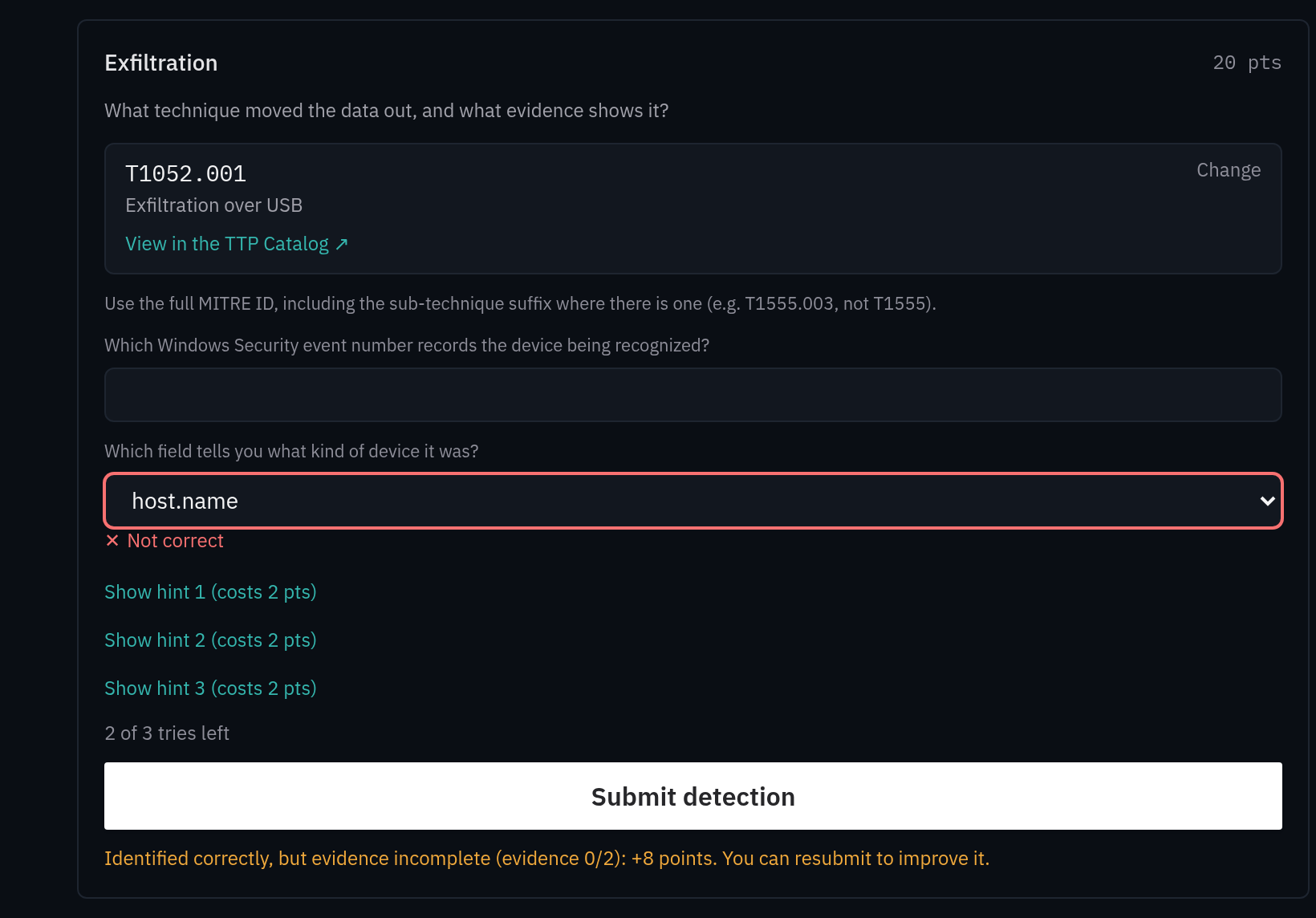
Shown in the dark theme
A practice detection card after one try, numbered to match the list below.
- Marker 1: Stage
- Marker 2: Technique box
- Marker 3: Evidence field marked wrong
- Marker 4: Tries left
- Marker 5: Reply line
Text in this screenshot
- Exfiltration
- 20 pts
- What technique moved the data out, and what evidence shows it?
- T1052.001
- Change
- Exfiltration over USB
- View in the TTP Catalog ↗
- Use the full MITRE ID, including the sub-technique suffix where there is one (e.g. T1555.003, not T1555).
- Which Windows Security event number records the device being recognized?
- Which field tells you what kind of device it was?
- host.name
- ✕ Not correct
- Show hint 1 (costs 2 pts)
- Show hint 2 (costs 2 pts)
- Show hint 3 (costs 2 pts)
- 2 of 3 tries left
- Submit detection
- Identified correctly, but evidence incomplete (evidence 0/2): +8 points. You can resubmit to improve it.
- Note 1: The stage tells you where you are in the attack, which narrows the techniques worth considering.
- Note 2: The technique was right, so its box is not marked and its share of the points is earned.
- Note 3: Only the field filled in wrong is marked. The blank field isn't marked and cost nothing: fill it once you're sure.
- Note 4: A try was used because a filled field was wrong, not because a field was left blank.
- Note 5: The reply line says what was earned and what is still missing.
Read the marks before you resubmit: they show exactly which box to fix.
Common mistakes
Mistake: Choosing the parent technique when a sub-technique fits.
InsteadOpen the catalog page and pick the sub-technique your evidence supports.
Mistake: Typing a technique without picking it from the list.
InsteadPick it from the search box, so the ID is exact.
Mistake: Filling evidence fields you're guessing at.
InsteadFill only what you're sure of. A wrong field uses a try; a blank one doesn't.
Mistake: Entering a time in your local time zone.
InsteadTimes are UTC. Follow the format line under the box.
Mistake: Adding words around a value.
InsteadEnter the value on its own.
Mistake: Revealing hints by reflex.
InsteadCheck the price first. A hint is worth it when it saves a locked question.
Check yourself
- 1.
- 2.
- 3.
Apply it in a Case
On First Light, before you search, write one line per detection: the stage, then the behavior in plain words. Find each technique in the catalog before you open the search box.
- CuckooSkills: SIEM searchTelemetry: Windows
- DragnetSkills: SIEM search
- GhostwriterSkills: SIEM searchTelemetry: Windows
References
- Enterprise techniques · MITRE ATT&CK
- T1052.001 Exfiltration over USB · MITRE ATT&CK
Related in Learn
- Your First InvestigationA start-to-finish walkthrough of your first session: launching a scenario, reading the briefing, how detections, objectives, tries, and hints actually work, and what to do when you get stuck.
- Thinking in MITRE ATT&CKThe shared language of detection work: what an attacker was trying to achieve and how. How to read ATT&CK, map evidence to it, and avoid the common mapping mistakes.
- Practice: The Expired CertificatePractice searching and writing up an investigation on a small set of invented records, before your first case.
- TTP CatalogA browsable reference of the adversary techniques our scenarios exercise: what each one is, how it looks in telemetry, how to hunt it, and how many cases let you practice detecting it.